What is heart rate variability?
Heart rate variability, or HRV, is the small variation in time between one heartbeat and the next. A heart that beats at sixty times a minute does not tick exactly once a second; the gaps stretch and shrink by tens of milliseconds as your nervous system balances effort against recovery. Apple Watch reports HRV as SDNN, the standard deviation of those gaps; devices that write to Health Connect on Android report RMSSD, the root mean square of successive differences. Both are in milliseconds. Higher values generally reflect a well-rested, adaptable state and lower values reflect stress, illness, alcohol or hard training, but the healthy range differs enormously between people and falls with age, so a single reading is close to meaningless on its own. What carries information is the change from your own usual level, which is why RestUp only ever shows HRV next to your personal baseline.
What is an HRV baseline?
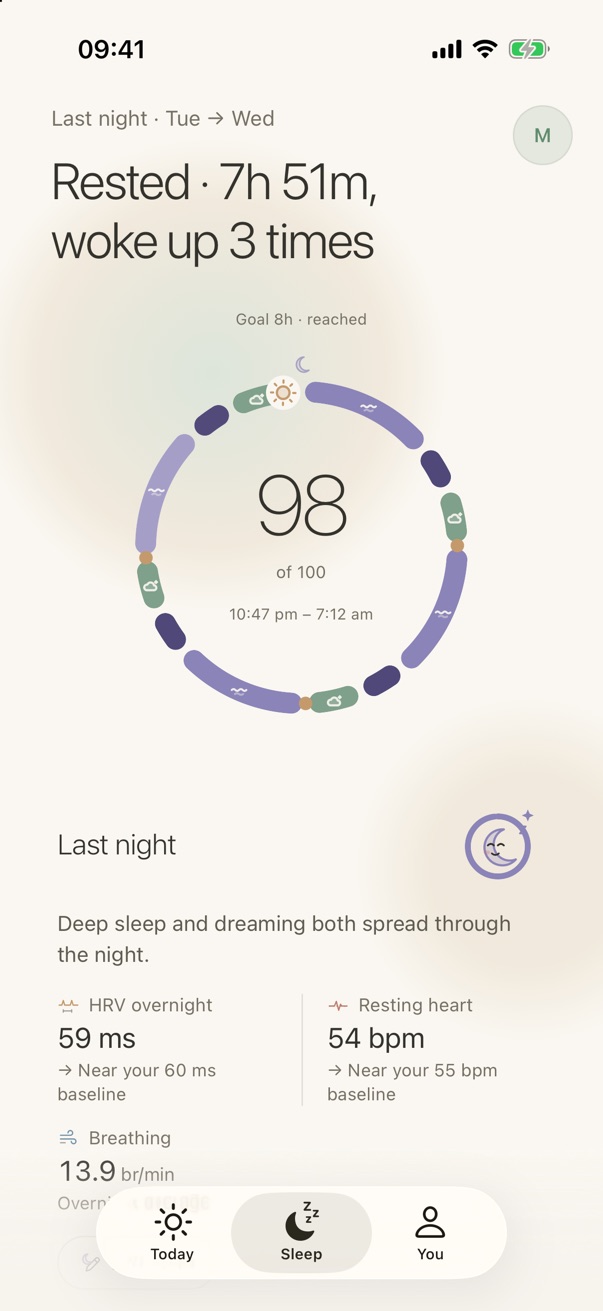
An HRV baseline is your own typical overnight HRV, used as the reference point for judging whether last night was high or low for you. RestUp builds it on your phone from your fourteen most recent recorded nights, taking the plain average of the overnight HRV values your watch recorded — SDNN as Apple Health reports it on iPhone, RMSSD as Health Connect reports it on Android. Either way the comparison is only ever with your own nights. The same fourteen-night average is kept for resting heart rate, bedtime, wake time and sleep length. On the Sleep screen a night is labelled above baseline when it is more than five percent over that average, below baseline when it is more than five percent under, and near baseline in between. The baseline moves with you, so a hard training block or a holiday gradually becomes the new normal instead of reading as a permanent alarm.
Fourteen nights is a compromise: long enough to smooth out one bad night, short enough to follow a real change in your life within a couple of weeks.
How readiness uses it
HRV appears twice in the readiness score, which is why it matters more than any other single signal:
- In recovery, as the difference in milliseconds from your 14-night average. Five or more above earns full marks; more than ten below earns none. The steps are the same number of milliseconds whether your phone supplies SDNN or RMSSD, and the two sit at different typical values, so they are not exactly the same size on both platforms.
- In nervous-system balance, as a percentage of your baseline. At or above your usual is good; ten percent under is a modest dip; twenty percent under is a clear one. A rising or falling seven-day trend nudges it slightly.
| Where | Compared as | Steps |
|---|---|---|
| Sleep screen label | Percent of baseline | More than 5% over: above. More than 5% under: below. Otherwise: near. |
| Recovery signal | Milliseconds from baseline | +5 or more: full. 0 to +5: 80%. −5 to 0: half. −10 to −5: a fifth. Below −10: none. |
| Nervous-system balance | Percent of baseline | +10% or more: full. 0 to +10%: 80%. −10% to 0: 60%. −20% to −10%: 35%. Lower: 10%. |
Resting heart rate is read the same way but in the opposite direction: a few beats under your usual is a good sign, a few over is not.
What a low reading does and does not mean
Common causes of one low night
- alcohol
- a late meal
- a hard session
- a cold coming on
- a hot bedroom
What RestUp does about it
suggests a gentler day. usually the right call, whatever the cause.
A single night well below baseline is common after alcohol, a late meal, a hard session, a cold coming on, or simply a hot bedroom. RestUp responds by suggesting a gentler day, which is usually the right call whatever the cause. Several nights in a row below baseline is worth noticing, and the seven-day trend on the Today screen is there so you can.
What HRV cannot do is diagnose anything. It does not identify illness, and RestUp never claims to. If you feel unwell, that feeling outranks the number.
Getting a reliable overnight reading
- Wear the watch snug enough that the sensor sits flat, and charge it before bed rather than overnight.
- On iPhone, turn on sleep tracking in the Watch app; Apple records HRV more often during sleep focus.
- On Android, wear the watch or band overnight, and check in the Health Connect app that its companion app is allowed to write heart rate variability. Not every maker writes it: Samsung Health documents syncing sleep and heart rate to Health Connect but not HRV or resting heart rate. When HRV is missing, RestUp leaves the HRV parts of the score out rather than guessing, and the Health Connect guide lists what each maker documents.
- Give it two weeks. Until the fourteen-night baseline exists, comparisons are drawn from fewer nights and RestUp says so.
Sources
- Apple HealthKit: heartRateVariabilitySDNN. Apple Health stores HRV as SDNN, in milliseconds.
- Android Health Connect: HeartRateVariabilityRmssdRecord. Health Connect stores HRV as RMSSD.
- Task Force of the ESC and NASPE (1996). Heart rate variability: standards of measurement, physiological interpretation and clinical use. Circulation 93:1043–1065. The standard definitions of SDNN and RMSSD.
- Shaffer F, Ginsberg JP (2017). An overview of heart rate variability metrics and norms. Frontiers in Public Health 5:258. Why age, sex and recording length change what a normal value is.
- Nunan D, Sandercock GRH, Brodie DA (2010). A quantitative systematic review of normal values for short-term heart rate variability in healthy adults. Pacing and Clinical Electrophysiology 33:1407–1417. Large differences between individuals.
- Plews DJ and colleagues (2013). Training adaptation and heart rate variability in elite endurance athletes. Sports Medicine 43:773–781. Reading HRV against a rolling personal average.
- Samsung Developers: accessing Samsung Health data through Health Connect (February 2025). The data types Samsung Health syncs.