Compare · checked 8 October 2026 · 6 sources
RestUp
vs SleepWatch
SleepWatch is a long-running sleep tracker that scores your night against everyone else’s. RestUp scores your night against your own, and turns it into a reading for the day ahead.
Both take your nights seriously.
- Both run on iPhone with Apple Watch, and on Android with watches that write to Health Connect.
- Sleep stages, sleeping heart rate and HRV, every night.
- Bedtime reminders.
- A free tier, a paid tier, and a seven-day way to try everything.
Where RestUp is different.
Measured against you, not a crowd.
A 59 ms HRV means little on its own. Next to your own 60 ms baseline it says “a normal night for you”. RestUp reads every signal against your last 14 nights.
Last night, turned into today.
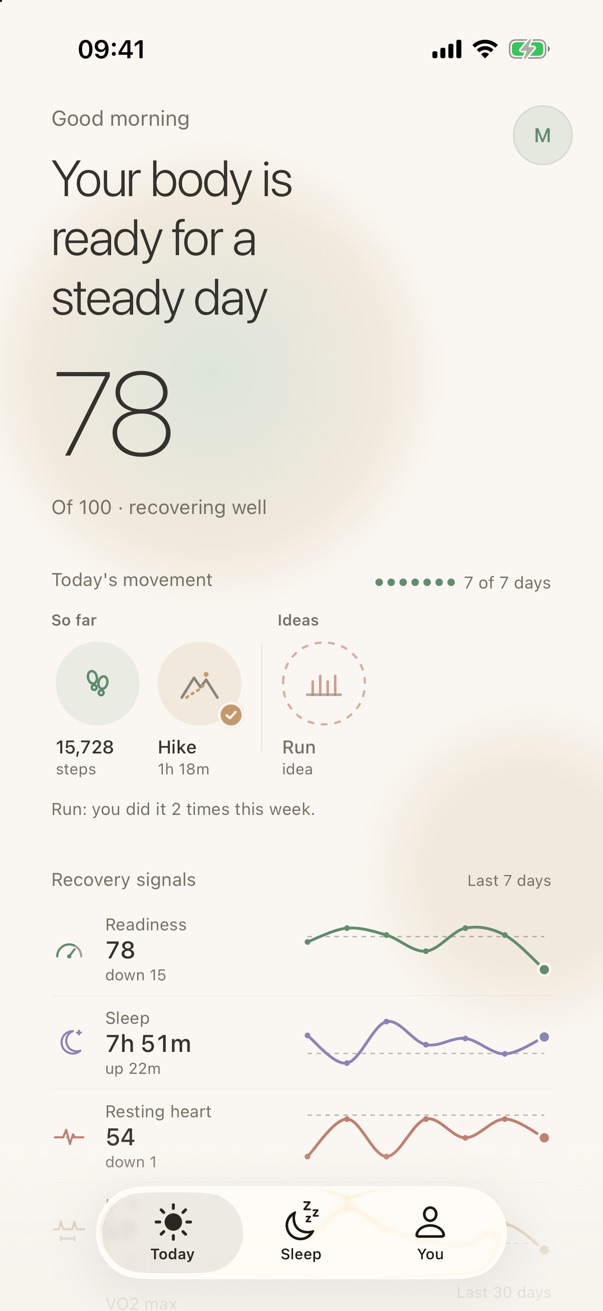
RestUp ends at a readiness score each morning: whether today is for pushing or for resting, with your movement and seven days of recovery signals underneath. The morning reading stays free after your first week.
No account. Health data stays on your phone.
RestUp has no account, and computes every score on your phone. There is no community pool for your nights to join.
Anonymous analytics about the app itself are the one thing that leaves your phone. You can switch them off.
A sleep debt, and your chronotype.
RestUp keeps a seven-night sleep debt and reads your chronotype from your nights, then tells you when tonight’s wind-down should start.
SleepWatch works without a watch, and hears you snore.
RestUp needs a watch that records your nights. SleepWatch can track from an iPhone on the nightstand, which you start by hand.
- Snore recording with a snore score and playback.
- A smart wake-up alarm, sleep sounds and white noise.
- See how your sleep ranks, worldwide and against people your age and sex.
- 4.7 stars from about 328,000 US App Store ratings.
Side by side
Checked 8 October 2026| Feature | RestUp | SleepWatch |
|---|---|---|
| Hardware | iPhone + Apple Watch, or Android via Health Connect | Apple Watch or iPhone alone; Android with Galaxy Watch, Fitbit, Pixel Watch or Galaxy Ring |
| Account | None | Email and password accounts; whether one is required is not stated |
| Where health data is processed | On your phone | Not stated; services operated from the United States |
| App Store privacy label | Anonymous app analytics only | Health and fitness data linked to you; nothing used to track you |
| Score | Readiness 0–100 and sleep score 0–100, against your own baseline | SleepWatch Score 1–999, against the SleepWatch community |
| Readiness or recovery | Yes, each morning | Not found |
| Sleep debt | Yes, 7-night ledger | Not found; 3-day sleep target |
| Chronotype | Yes | Not found |
| Snoring, smart alarm | No | Yes; smart alarm in Premium |
| Free trial | 7 days, then a free tier | 7 days of Premium |
| Price | RestUp Plus; price in the App Store or Google Play | Premium $4.99 / month or $39.99 / year, per its listing |
| Ratings | New; too few ratings to show | 4.7 from about 328,000 (App Store); 3.8 from 62 (Google Play) |
SleepWatch facts from sleepwatchapp.com, its help centre and privacy policy, and its US App Store and Google Play listings, checked 8 October 2026. The App Store also lists other Premium price points; the ones quoted are from its description.
Which one should you pick?
You do not wear a watch to bed, want snoring recorded or a smart alarm, or like seeing how your sleep compares with other people’s.
You already sleep in your watch and want each night read against your own normal, turned into a plain answer for the day, with no account and your health data kept on your phone.
Sources
- SleepWatch on the App Store: platforms, pricing, privacy label, snoring, rating
- SleepWatch on Google Play: supported wearables, rating
- SleepWatch Score guide: range, bands, inputs, community comparison
- SleepWatch Premium: trial, smart alarm, community of 100 million nights
- SleepWatch privacy policy: accounts, United States operation, de-identified data
- SleepWatch help: account types